How to Easily Create Free Personal Blog on Blogger | Posts for this time I specialize sobat2 less knowledge of how to easily create a free blog on blogger.com private. So if my friend is an expert in creating a blog, would read simply want to ignore as well please, as it is specific to that really do not get to make a free blog.
Actually there are plenty of free blog services that we can use, but for the uninitiated could make a better blog create a blog on blogger.com, because I think blogger.com very suitable for the new study. For how to create a free blog on services like wordpress and blogdetik God willing I will discuss the other ditulisan.
OK, now we start just how to easily create a free personal blog at blogger.com:
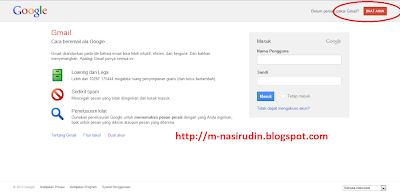
1. The first requirement to be my friend do to create a blog on blogger.com is having an email account at gmail.com. By email at gmail.com has not blogger.com are accessible but all the facilities of google can be used. to create a gmail email account please type dibrowser pal gmail.com, or click here .
then click create account.
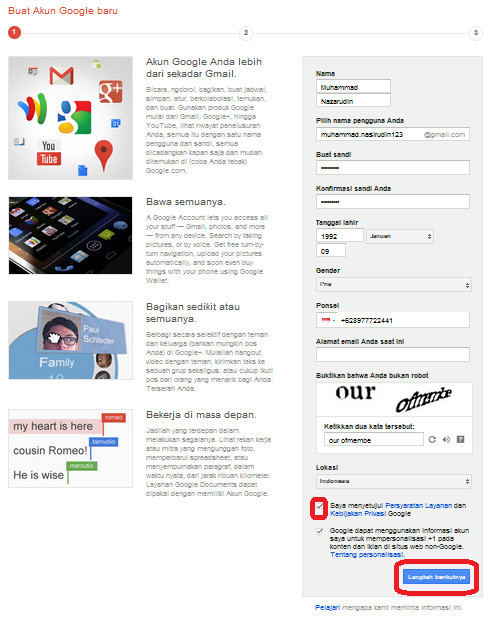
 2. After my friend will appear click the form to be filled with data including no phone buddy buddy. Once all the data on the contents click next step .
 3. After that, select the text, Indonesian state, and click send verification code .Furthermore friend will receive an SMS verification code from Google to fill in following in step.
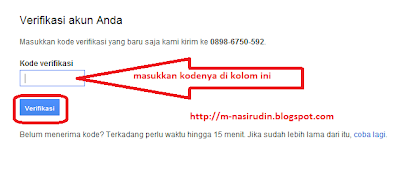 After clicking dimakukka code verification.
4. Furthermore buddy profiles include photos, but optional at this stage. my friend can directly enter a profile photo or not. if you want to get past just click next step.
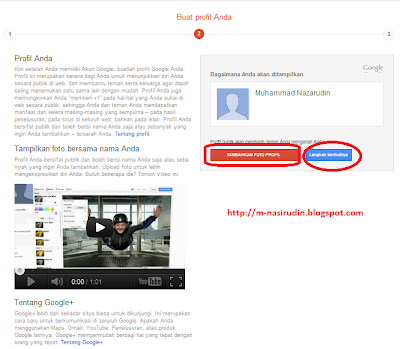 5. In the next step just click Continue to Gmail.
6. Then it will immediately appear next friend like this gmail account.
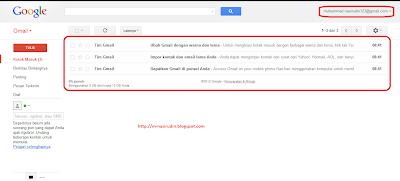 7. Up to this point my friend gmail account has been created. now is the time to make the first personal blog buddy .. ready?? Please click Blogger.com to start a blog.
8. Buddy will be asked to re-enter the password in gmail earlier. Then click Login.
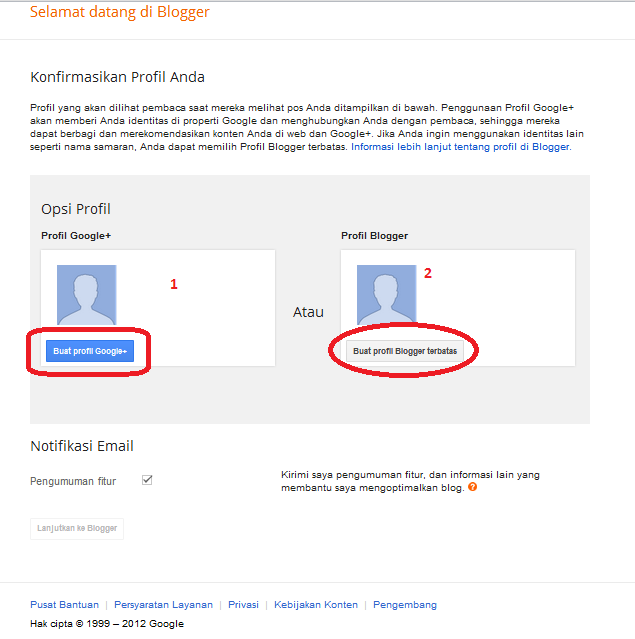
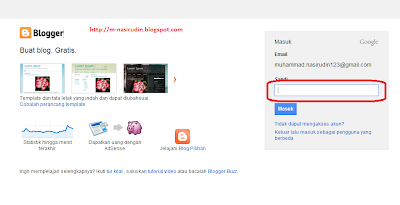 9. Furthermore buddy will be asked to fill data to profile your blog. Here there are two options, option 1 if my friend wanted to make a blog profile google + profile.option 2 if my friend just wanted to create a profile for a blog without a google account associated with +.
Google + google is a fairly new service, this account such as facebook. I recommend option 1 only.
 10. In the next step just click the upgrade to continue.
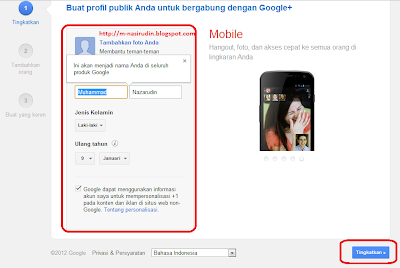
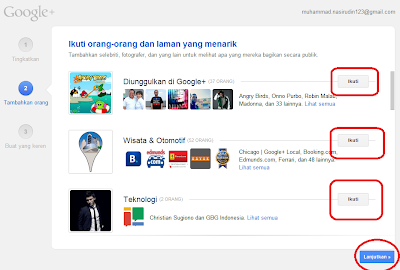
11. Click the Follow if my friend wants to join the page. Then click Continue
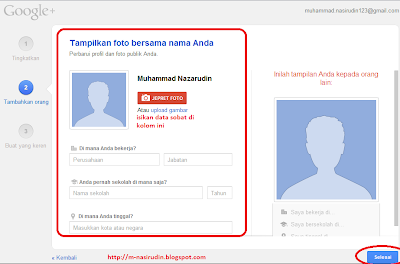
12. Enter the data and profile picture, buddy, but not diisipun not apa2. Then clickFinish.
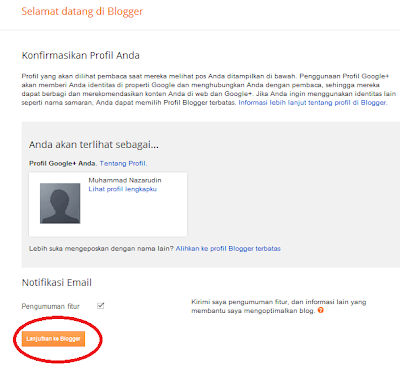
13. In the next step click Continue to blogger .
14. After that my friend will go straight to your blog dashboard page .. but the blog has not been made.
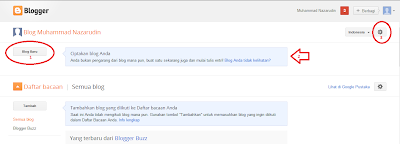 to start a blog, please click comrade New Blog indicated at number one in the picture above, the number 2 will appear for an existing blog buddy. the number 3 is the place to set your blog. one of which is to change the look of the dashboard to the old look. Ok buddy click next after New Blog new form will appear as below.
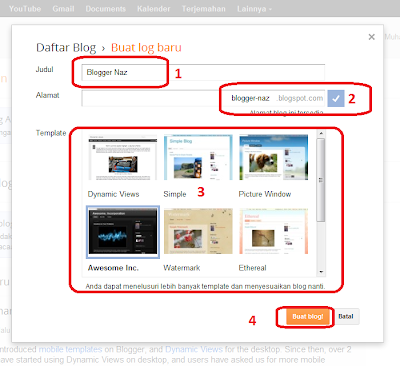 seen in the image above there are several numbers, deliberately so easy to explain.
at No. 1 Enter a name for your blog, it's up to the content of what is going on, a personal name can be. for number 2 is to address your blog, like the example above is a blogger-naz.blogspot.com. upon charging number two wait until there are signschecklist blue as above. for the number 3 is the preferred blog page design, please choose according to taste. then click Create a blog.
15. Once completed, the blog was created.
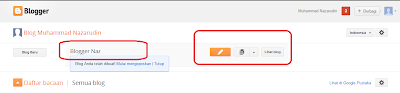
to start writing please click the button with pencil.
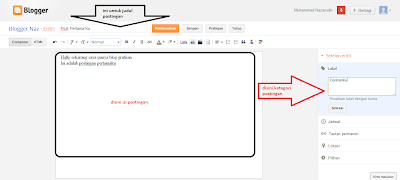
in the example above is the title of my post "My First Post" .. post the content "Hello I now have a free blog. This is my first post" and the category "Coretanku" .. free pal would fill it with anything ..
Do not forget when you're done, Click Publish to display its news ..
16. after that try to see the results by clicking View blog .
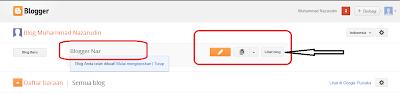 Let's see an example of the post I made earlier ..
Actually there are plenty of free blog services that we can use, but for the uninitiated could make a better blog create a blog on blogger.com, because I think blogger.com very suitable for the new study. For how to create a free blog on services like wordpress and blogdetik God willing I will discuss the other ditulisan.
OK, now we start just how to easily create a free personal blog at blogger.com:
1. The first requirement to be my friend do to create a blog on blogger.com is having an email account at gmail.com. By email at gmail.com has not blogger.com are accessible but all the facilities of google can be used. to create a gmail email account please type dibrowser pal gmail.com, or click here .
then click create account.


4. Furthermore buddy profiles include photos, but optional at this stage. my friend can directly enter a profile photo or not. if you want to get past just click next step.

6. Then it will immediately appear next friend like this gmail account.

8. Buddy will be asked to re-enter the password in gmail earlier. Then click Login.

Google + google is a fairly new service, this account such as facebook. I recommend option 1 only.


11. Click the Follow if my friend wants to join the page. Then click Continue

12. Enter the data and profile picture, buddy, but not diisipun not apa2. Then clickFinish.

13. In the next step click Continue to blogger .

14. After that my friend will go straight to your blog dashboard page .. but the blog has not been made.


at No. 1 Enter a name for your blog, it's up to the content of what is going on, a personal name can be. for number 2 is to address your blog, like the example above is a blogger-naz.blogspot.com. upon charging number two wait until there are signschecklist blue as above. for the number 3 is the preferred blog page design, please choose according to taste. then click Create a blog.
15. Once completed, the blog was created.

to start writing please click the button with pencil.

in the example above is the title of my post "My First Post" .. post the content "Hello I now have a free blog. This is my first post" and the category "Coretanku" .. free pal would fill it with anything ..
Do not forget when you're done, Click Publish to display its news ..
16. after that try to see the results by clicking View blog .


Tidak ada komentar:
Posting Komentar